
For education providers
Where competences are missing, your course gets recommended.
Your courses are recommended to people who lack exactly these competences for their career goal. You upload your offering once, and enrolments come straight to you.
 University
 University of applied sciences
 Further training
Made foruniversities, universities of applied sciences, higher education institutions and further training institutes

Listed doesn't mean recommended yet.
Your institution invests a great deal in teaching and curricula. In the course catalogue, all of that becomes a single line: title, date, price. The catalogue doesn't show which competences a course builds or who it suits.
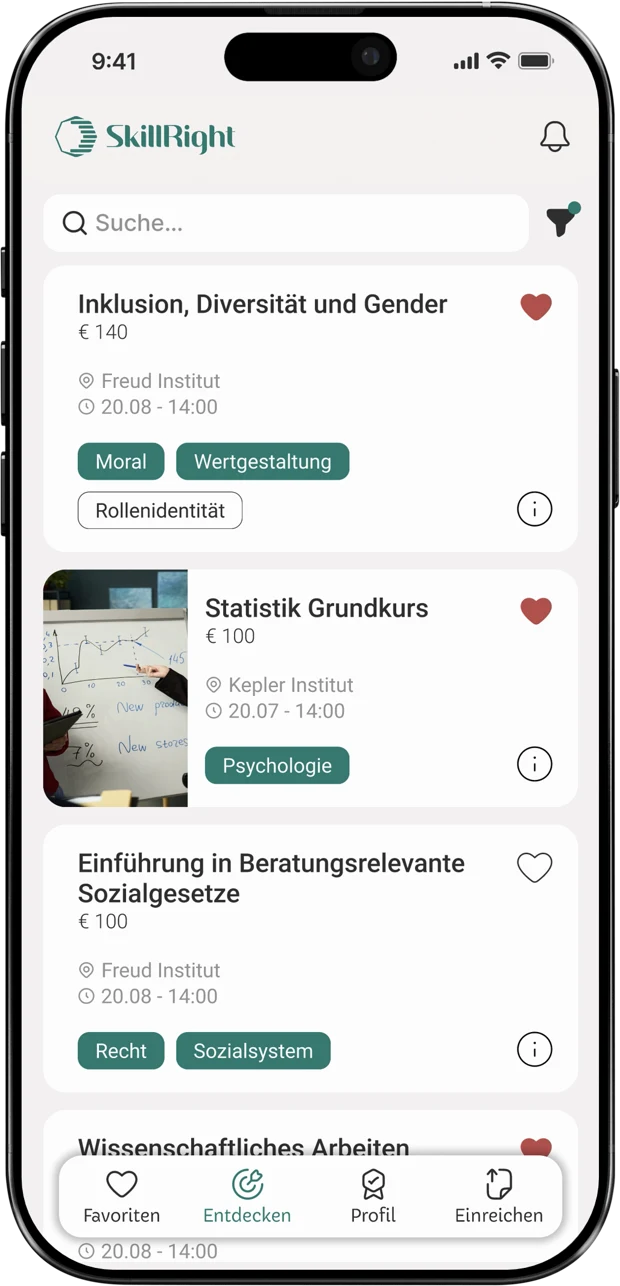
In the catalogue, your course is one of many
Title, date, price: every entry looks like this. The competences your course builds only appear in the details.
Advertising reaches many, rarely the right people
Campaigns bring reach. But they don't tell you whether someone actually needs your course.
Unsuitable enrolments cost time
If prior knowledge and goals don't match, queries, rebookings and drop-outs follow.


How your course finds the right participants.
SkillRight compares what a person can do with what their career goal requires. If a competence your course builds is missing, it appears as a suggestion.
A recommendation with reasons. Not an ad.
An ad claims that a course fits. SkillRight shows why: next to your course are the competences it builds.
| Catalogue |  | |
|---|---|---|
| Found via | Title and keyword | Competences someone is missing |
| Reaches | Everyone currently searching | People with a matching need |
| Argument | Your course description | The gap in the competence profile |
| Timing | Sometime while browsing | When further training is being planned |
See for yourself how your course appears as a recommendation.
Book an intro callFree · 45 minutes · no obligationYou manage your course offering yourself. Simply in the back office.
In the back office, you create courses, programmes and further training and keep them up to date: edit descriptions, upload videos and materials, assign competences. You receive every enrolment by email.
 My coursesVideo or image
Create courses
Set up title, date and description in just a few minutes.
Edit content yourself
Upload videos and PDFs, change texts at any time. No need to go through us.
Assign competences
You decide which competences your course builds. From then on, it is recommended where it fits.
Enrolments by email
Every enrolment lands directly in your inbox.

Course and competence profile speak the same language.
SkillRight describes your courses and people's competences using the same framework. That's why a suggestion fits not just by title, but by content and level.
Matching by competences
What gets recommended is what closes a gap. Not what is advertised loudest.
Aligned with the NQF
The levels are based on the National Qualifications Framework you know from your curricula.
Scientifically grounded
The competence web behind SkillRight was developed at WU Vienna in a project with the WKO and reviewed by 73 experts.
Source: Fahrenbach et al., Education + Training 64(1)FAQ from education providers
Your question isn't here? In the intro call we'll take the time to answer it.
What offerings can we upload to SkillRight?
Courses, programmes, and degree and further training offerings. We'll work out together in the intro call which formats make sense for your institution.
How do our courses get into the system?
You create them yourself in the back office: set up title and description, upload videos and PDFs, assign competences.
Can we change courses later?
Yes. You can edit texts, dates and materials yourself at any time.
Who are our courses suggested to?
Wherever SkillRight is used: for example in career and education guidance, in companies or in the specialist groups of professional associations. Your course appears when a competence profile shows exactly that need.
How do we receive enrolments?
By email. Every enrolment for one of your courses comes straight to you.
How secure is the data?
SkillRight is GDPR-compliant. The data is stored on servers in Europe, and AI processing also takes place in Europe.
How do we get started with SkillRight?
With an intro call. Afterwards we set up your access, and you can create your first courses.
See how your courses look in SkillRight.
In the intro call, we show you the back office live. Afterwards we set up your access, and you create your first courses.